

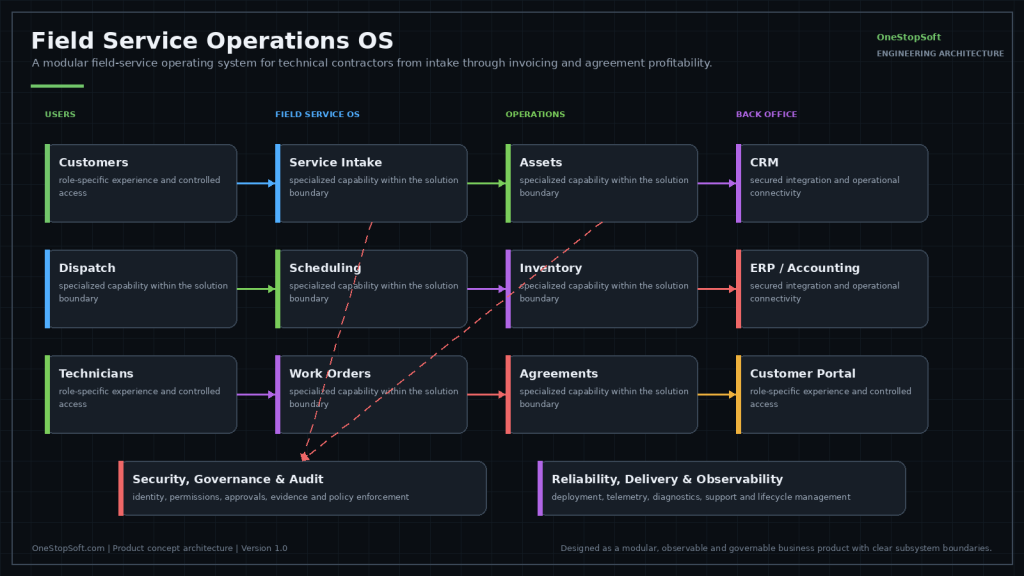
Technical service companies are usually running a scheduling tool, an accounting package, a spreadsheet of service agreements, and a shared mailbox. Each works. Together they cannot answer the question that decides whether the business is healthy: is this customer, on this agreement, actually profitable?
Status: product concept, in active development. This is something we are building, not something you can buy today. We publish our roadmap because the engineering thinking behind it is the useful part — and because we would rather show you the design than imply a finished product.
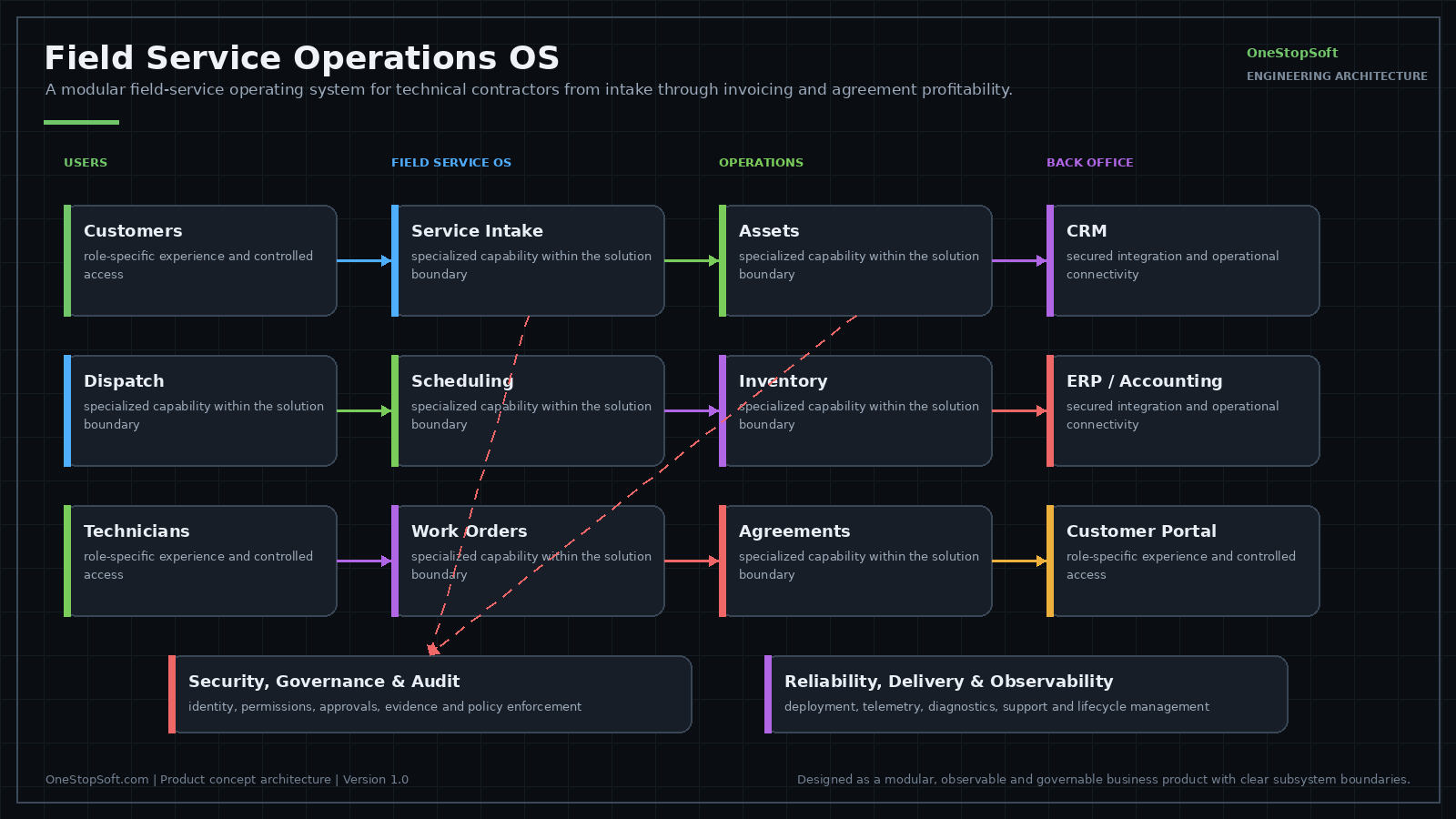
Designed Capabilities
- Customer, site and asset hierarchy — equipment tracked where it lives, across multi-site customers.
- Service request intake and triage — calls and emails become structured, prioritised work.
- Scheduling, dispatch and route planning — the right technician, sensibly routed.
- Offline mobile work orders — because plant rooms do not have signal.
- Checklists, photos and signatures — evidence captured at the job, not reconstructed after.
- Time, material and purchasing capture — real cost, recorded once.
- Quotes and invoice integration — the work becomes a bill without re-keying.
- Preventive maintenance and agreement profitability — which contracts make money.
Profitability Is the Feature
Dispatch software is a solved problem; plenty of it exists. What technical contractors usually lack is the line from a dispatched hour back to a specific agreement, so nobody discovers an unprofitable contract until renewal. Designing around the asset and the agreement rather than the work order is what makes that visible.
Tell us if this matches a problem you have — early input shapes what we build first, and we will give you an honest view of where it stands.
Related services
- Business Process Automation — Dispatch and scheduling work we deliver today: business process automation.
This Is a Design, Not a Product You Can Buy
The Field Service Operations OS is a design on paper. There is nothing to buy, license, pilot or schedule today. If the problem is live for you now, the practical route is to make the systems you already run behave better together.
Connecting the dispatch tool to accounting, giving service agreements a structured record somewhere, and building the agreement profitability report nobody currently has will cover a lot of that ground. That is Business Process Automation and CRM and ERP Integration work, and it is available now.
How to Compare Field Service Packages
If you are evaluating vendors this quarter, expect every demo to lead with dispatch, because dispatch is the part the category does well. The questions that separate one package from another tend to be duller.
- Can it model a customer with many sites and multiple pieces of equipment per site, including equipment that moves
- Does a work order link back to a specific asset and a specific agreement, or only to a customer
- Can an agreement carry different covered parts, labor rates and response times per site
- Does the system know the difference between a warranty claim, a covered visit and a billable call before the invoice is raised
- What happens to a technician’s data when signal drops mid job
- Who configures the system after go-live, and what would that person need to know
The Asset Hierarchy Is Where These Projects Get Hard
Scheduling logic is well understood. What resists is the record of what equipment exists, where it sits, what it is attached to, and which obligations follow it. A rooftop unit replaced under warranty is a new object with an inherited history. A tenant moves out and the panel stays. A serial number gets recorded once, badly, and every later question inherits that.
Getting that model right is the reason a system can answer a profitability question at all, and it is the part of a migration off an incumbent system that tends to consume the schedule.
What Offline Really Means in the Field
Offline is a synchronization problem. Storing a form locally is straightforward. Deciding what happens when a technician edits a work order in a basement while dispatch reassigns it upstairs is the design question. Any package you evaluate should be able to describe its conflict behavior in a sentence you understand. If the answer is vague, assume you will discover it during a busy week.
Who This Is Not Being Designed For
A single-truck operation does not need this, and neither does a business that is purely break-fix with no agreements, no equipment worth tracking and no recurring obligations. The design assumes agreements, assets and multi-site customers, because that is where the profitability question gets hard to answer. If that is not your shape, a solid scheduling tool and clean bookkeeping are the better fit.
Frequently Asked Questions
What is the Field Service Operations OS, and what is it not?
It is designed as a system of record for customers, sites, assets and agreements, with intake, dispatch and mobile work orders sitting on top of that record instead of beside it. It is not an accounting package: the general ledger, payroll and tax filing are meant to stay where they are. It is not a replacement for the estimating, monitoring or building automation tools a contractor runs for other reasons. And it is not a reporting layer bolted onto a dispatch board, because no report can invent an asset link that was never captured at the job. None of it can be installed today; this is a design being described.
What has to already exist on our side before this would be useful?
Three things, none of them software. Agreement terms recorded somewhere a person can transcribe them: what each customer is entitled to, at which of their sites, and what makes a visit under an agreement bill differently from one outside it. Plenty of contractors hold that only in a signed PDF and in one person's memory, and no design can infer it. An accounting or ERP system that exposes customers, invoices and posted cost through an API or a supported export, since a profitability line is only as real as the cost that lands against the agreement. And managed mobile devices, because the offline design assumes a device that can hold job data between syncs.
How is a rollout designed to proceed, and in what order?
In an order that front-loads the parts that are expensive to correct later. First the customer and site structure, since everything else hangs off it. Then the asset register, site by site, with a naming and tagging convention agreed before anyone starts typing. Then agreements mapped onto those assets and sites. Then the accounting integration, proved against a small batch of invoices before anyone depends on it. Dispatch and the mobile app are designed to come last, because they are the cheapest part to adjust and the part technicians judge on day one. Run that sequence backwards and you get a working dispatch board on a register nobody trusts.
How is it designed to integrate with the systems we already run?
Through defined ownership per object rather than two way sync everywhere. The intent is that accounting stays authoritative for customers, invoices and posted cost, while assets, agreements and work orders are authoritative here, so every field has exactly one place it can be corrected. Writes toward accounting are designed to carry an idempotency key, so a retried call after a timeout does not raise a second invoice for the same work order. Where a customer runs Microsoft 365, the design assumes Graph for mail based intake and for filing job documents where the rest of the business already keeps files, rather than standing up a second document store.
What is the design's answer on offline conflicts?
As designed: dispatch decisions are server authoritative and field evidence is append only. If a work order is reassigned while a technician is in a basement, the device is designed to hold a local queue with client generated ids, and on reconnect the technician's notes, photos, time and material lines are meant to attach to the job rather than be quietly replaced by the server copy. Assignment itself is designed to resolve to the server, with the technician told what changed instead of discovering it at the next stop. Where the conflict is really a business question, such as a signature captured against a scope that changed mid job, the design's answer is to flag it for a person rather than pick a winner silently.
Where is our data designed to live, and what stays under our control?
The design keeps a customer's data in its own database with role scoped access, so a subcontractor login can be limited to the sites they work and a technician does not need agreement pricing visible to close a job. Photos and signatures are designed to be stored as files carrying the work order id and capture timestamp, not embedded inside a generated report that has to be parsed back out later. Two properties are treated as requirements rather than options: a full export of the asset register, agreements and work order history in a documented format at any time, and a retention period the customer sets for field evidence, since photos accumulate faster than anything else in the system.
What is designed to happen to history from the system being replaced?
The design separates three kinds of history, because they carry different value per hour of mapping. The asset register and agreement terms have to come across, since every later question depends on them. Open work orders and scheduled preventive maintenance visits have to come across, because that work is in flight on the day you switch. Closed work orders and their invoices usually do not; the design's intent is to carry a short reference on the asset, such as date, description and invoice number, and leave the detail in an export or in the old system kept read only. Which of the three you actually need is a customer decision, and it moves the size of the project more than any feature choice.
What would we have to decide ourselves?
Policy, mostly, not configuration. Whether a replacement unit inherits its predecessor's agreement coverage and remaining preventive maintenance schedule or opens a record that starts clean, because those two answers produce different profitability numbers for the same site. Who may reclassify a visit from covered to billable, and whether that can still happen after the technician has left site. Whether a technician can create an asset in the field or only raise one for someone to verify. How far a route can be reordered without dispatch approval. A system can enforce any of these; it cannot choose them for you, and deciding them late is what makes a configuration effort stretch.